Adaptive Mega Menu for your store added to Hotlist.biz
We have implemented a new navigation format — Mega Menu. Now you can display store categories through a convenient burger button that opens a modern section management panel.
Key Features:
- Versatility: installed via the standard categories widget in any part of the site.
- Smart Nesting: if a category has deeper levels (3rd and more), sub-items open directly inside the mega menu, replacing the main content. A "Back" button appears for easy navigation.
- Mobile Version: automatic transition to full-screen mode on smartphones while preserving all transition logic.
Available Modes:
1. Standard (parameter :megamenu)
Step-by-step disclosure of sub-sections. Ideal for stores with a very broad category structure.
2. Expanded Grid (parameter :multiply)
Displays all nested subcategories in the right panel at once in a grid format. The customer can see the structure of the entire section at a glance.
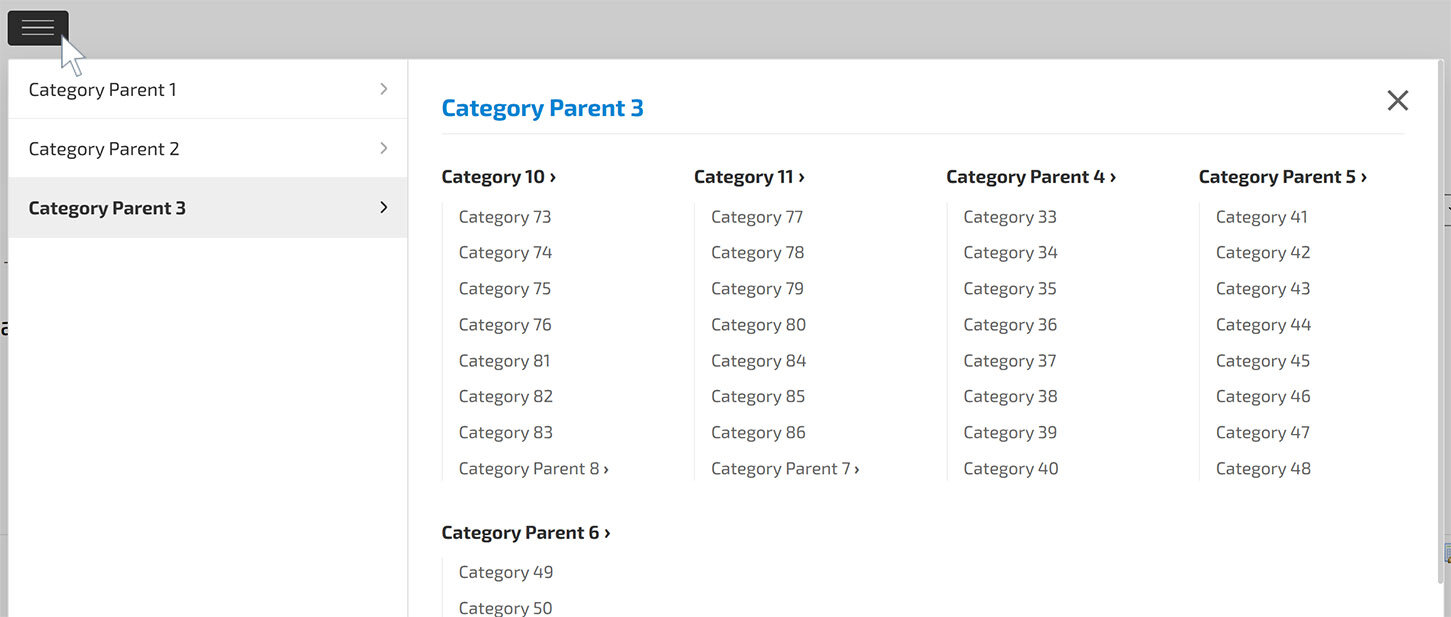
How to enable: In the category widget settings, add the required parameters:
:megamenu or
:megamenu:multiply.
Make your store's navigation professional today!